
Render AI
Render AI — Turn Any Design into a Real Image
A render AI built for architecture: upload, pick a style, and get photoreal results in seconds — straight from your browser.


 4.9110,000+ architects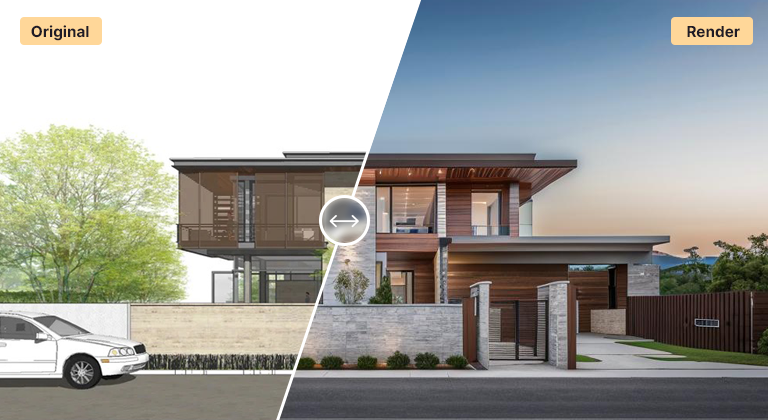
Render AI is an online rendering tool made for architecture and design workflows. Instead of configuring a render engine, you upload a design — a model export, a sketch, or a photo — pick a direction, and AI Render Studio produces a photorealistic image in seconds. Everything happens in the browser, so there is nothing to install and no hardware to buy.
The appeal is speed at the concept stage. Rendering AI lets you show a client four ways a scheme could look while the idea is still fresh, test materials and lighting without rebuilding a scene, and keep momentum in a design review. It handles exteriors, interiors, masterplans, landscapes, plans, and sketches from one interface.
You guide the output with style presets and an optional prompt, so the render reflects your intent rather than a generic look. When a result works, upscale it to a high-resolution image ready for a deck, a board, or a proposal.
FAQ
Frequently asked questions
Does render AI work in the browser?
Yes. It is fully online — no desktop software, plugin, or GPU. Upload an image from any device and render.
What design types can it render?
Exteriors, interiors, masterplans, landscapes, floor plans, and hand sketches. Each has a tuned workflow, and you can switch between them freely with the same account.
Can I use render AI outputs commercially?
Yes. Renders you generate are yours to use in presentations, proposals, and marketing. Start with the free credits to confirm the quality on your own project first.
Keep exploring
Related tools
Start free
Try AI Render Studio now.
Turn a sketch, model or photo into a photoreal render in seconds. 3 free credits, no credit card.