
AI Interior Design
AI Interior Design — Restyle Any Room in Seconds
Upload a photo of the room, pick a look, and see it redesigned — furniture, materials and lighting included — before you move a single thing.


 4.9110,000+ architects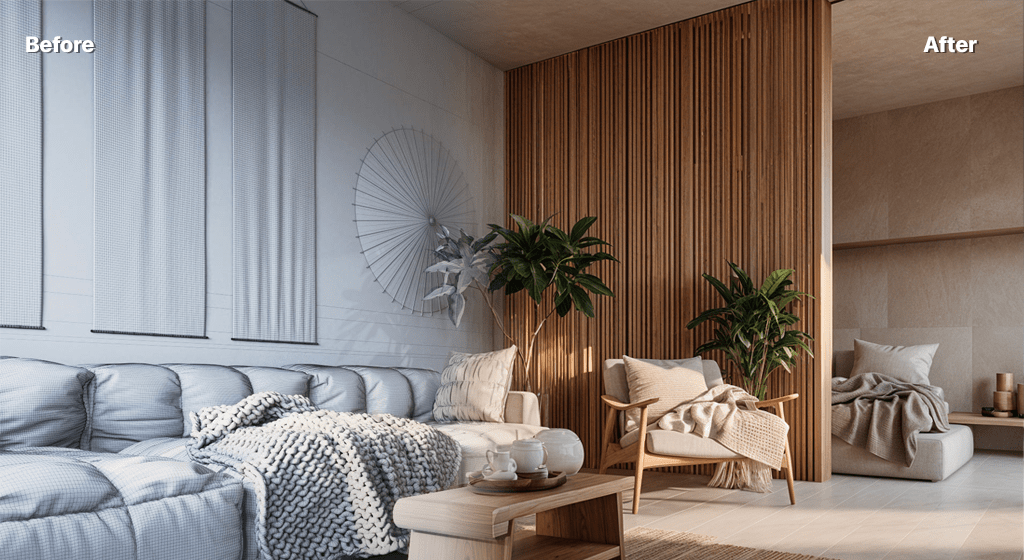
AI interior design turns a plain photo of a room into a fully styled concept in seconds. Upload a snapshot of an empty shell, a dated living room, or a 3D model export, choose a design direction, and AI Render Studio returns photorealistic interiors with new furniture, finishes, and lighting — so you can decide how a space should feel before spending a cent on it.
Homeowners use it to preview a renovation, designers use it to pitch several directions in one meeting, and stagers use it to show a property's potential. Because each generation takes about twelve seconds, you can compare a Scandinavian, japandi, industrial, and mid-century version of the same room side by side instead of committing to a single mood board. If the job is staging listing photos for the MLS rather than exploring a design, our sister product StageHQ does AI virtual staging built for real estate agents — furnishes an empty room from one photo and ships it with the disclosure badge most MLS rules now ask for.
You stay in control of the look through simple style presets and an optional text prompt — call out oak floors, a plaster fireplace, or floor-to-ceiling glazing and the AI works those cues into the result. When you find the winning frame, upscale it to a crisp, presentation-ready image.
FAQ
Frequently asked questions
Can I redesign a room from a phone photo?
Yes. A straight-on phone photo of the room is one of the best inputs. Keep the whole space in frame with reasonable lighting and the AI will preserve the layout while restyling furniture, materials, and finishes.
Can I keep the room layout and only change the style?
Yes. The AI respects the existing walls, windows, and proportions of your photo and changes the furnishing and finish level. Use the prompt to lock in specifics like "keep the sofa position" or "warm minimalist palette".
Which interior styles are supported?
You can generate modern, minimalist, Scandinavian, japandi, industrial, mid-century, traditional, and more. Pick a preset or describe the palette and materials you want in the prompt for finer control.
Keep exploring
Related tools
Start free
Try AI Render Studio now.
Turn a sketch, model or photo into a photoreal render in seconds. 3 free credits, no credit card.