
Render AI Free
Render AI Free — Photoreal Renders, No Card
Try AI rendering with three free credits on signup. Full-quality results, no watermark, no credit card, nothing to install.


 4.9110,000+ architects
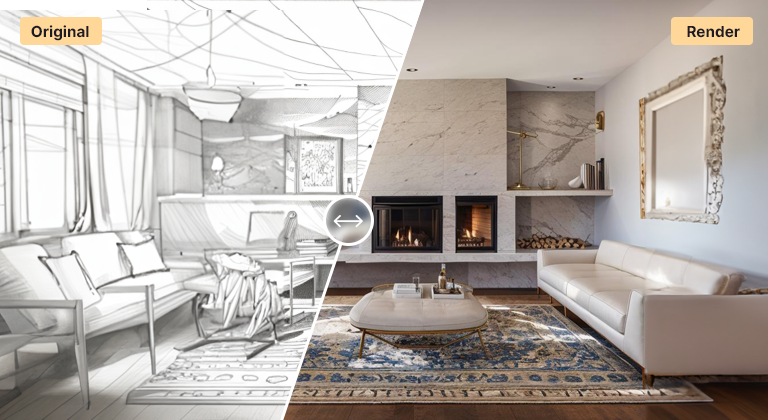
Render AI free means you can test full AI rendering before paying anything. Every new AI Render Studio account gets three free credits, and the results are complete, un-watermarked, high-quality images — not limited previews — so you can judge the tool on real output from your own project.
There is no credit card at signup and nothing to install. Upload a sketch, a model export, or a photo, pick a style, and generate photoreal renders in about twelve seconds. The free credits work across every workflow — exterior, interior, masterplan, landscape, plan, and sketch-to-render — so you are not limited to a single demo.
If the tool earns a place in your workflow, paid plans stay affordable and scale with how much you render. If it does not, the free credits cost you nothing. Either way you get a genuine result to evaluate rather than a locked-down trial.
To get the most from a render AI free trial, test it on a real project rather than a sample image. Pick one view you would normally spend a day rendering — a SketchUp exterior, a floor plan, a hand sketch — and run it through the tool. Judging the result against your own standards tells you far more than any gallery.
Spread your free credits across different inputs. Try one exterior, one interior or plan, and one sketch, so you learn which workflows suit your practice. The AI rendering overview explains each tool, and the free credits work on all of them.
Prepare inputs before you spend a credit. Hide grids, labels and annotation, export at a large size, and write a short prompt naming the materials and light you want. A clean input and a focused prompt are the difference between a useful first result and a wasted attempt.
If the tool proves useful, choose a monthly plan you can cancel anytime or a one-time pack whose credits never expire — so quiet months cost nothing. See pricing for current plans and packs.
Use cases
Who it’s for
Architects evaluating AI tools
Test AI rendering on a live project before proposing it to partners, with real output to show rather than a vendor demo.
Students and graduates
Produce strong portfolio and studio images without licences or a powerful laptop, and pay only if you need more renders later.
Freelancers with occasional work
Render when a project needs it and pay nothing in between, since one-time packs need no subscription to keep running.
Homeowners exploring ideas
Try new looks for your house, garden or kitchen from a photo before speaking to a designer, without signing up for a plan.
Workflow
Traditional rendering vs AI Render Studio
| Task | Traditional workflow | With AI Render Studio |
|---|---|---|
| Try a render tool | Install software, start a trial | Sign up in the browser, no card |
| First render | Learn materials and render settings | Upload an image, about 30 seconds |
| Hardware | Workstation with a strong GPU | Any computer with a browser |
| Ongoing cost | Monthly or yearly licence | Plan from $19/mo or a one-time pack |
Tips
How to get the best results
Use a real project
Upload a view from current work rather than a test model. You will judge quality against a standard you know and may get a usable image too.
Prepare before spending
Clean the input — hide grids, text and helpers, export large — so each free credit goes towards a result rather than troubleshooting.
Try different tools
Use free credits on an exterior, an interior or plan, and a sketch. Each tool behaves differently and suits different stages of a project.
Write a short prompt
Name two or three materials and the light, such as “brick and oak, soft morning light”. Short, specific prompts beat long wish lists.
FAQ
Frequently asked questions
How many free renders do I get?
Three free credits on signup, with no credit card required. Each credit produces a full batch of variations you can download and use.
Are the free renders watermarked?
No. Free renders are full quality with no watermark, so what you generate during the free credits is usable straight away.
What happens after the free credits run out?
You can keep going on an affordable paid plan, or stop — there is no obligation. The free credits are meant to let you evaluate the tool honestly on your own work.
Can I use free renders commercially?
Yes. Renders made with free credits are the same full-quality images as paid ones, and you can use them in client presentations, portfolios, proposals and marketing. As with any visual, present concept renders as illustrative where accuracy matters, for example in sales or planning material.
Do I need to install anything or have a good GPU?
No. AI Render Studio runs in the browser and processes renders in the cloud, so any laptop or desktop with a modern browser works. There is no plugin for SketchUp, Revit or other software — you export an image from whatever tool you use and upload it.
What resolution are the free renders?
Free renders are the same high-resolution downloads as paid ones, suitable for screens, presentations and portfolios. For large-format print or detailed crops, the built-in upscaler adds sharpness and fine detail to a chosen image. Uploading a large, clean export in the first place also improves the result.
Keep exploring
Related tools
Start free
Try AI Render Studio now.
Turn a sketch, model or photo into a photoreal render in seconds. 3 free credits, no credit card.