
AI Exterior Rendering
AI Exterior Rendering — Photorealistic Facades in Seconds
Your facade deserves better than a grey screenshot. Upload any model export or sketch and watch it become a photoreal street view in seconds.


 4.9110,000+ architects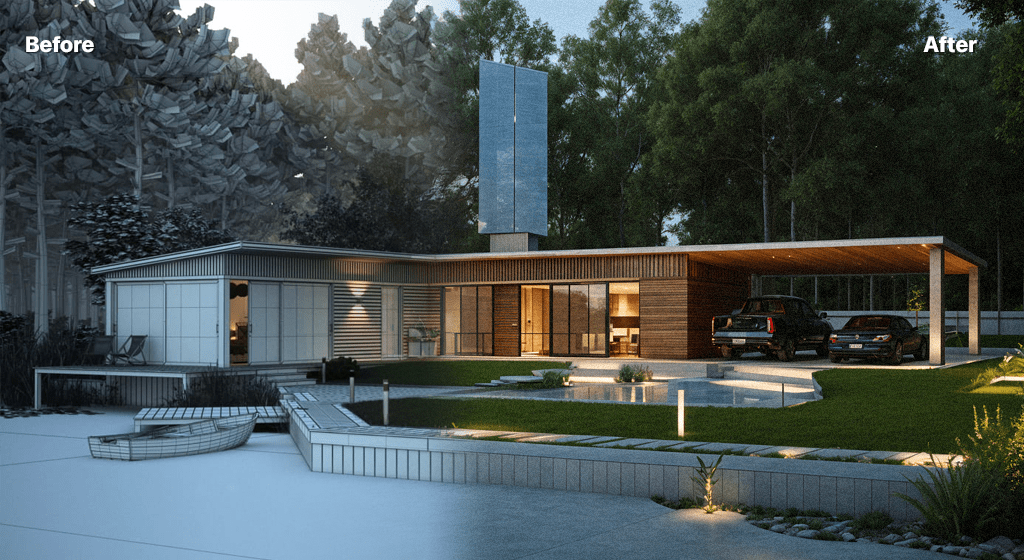
AI exterior rendering transforms how architects visualize building facades, elevations, and street views. Instead of spending hours setting up V-Ray scenes or waiting days for a visualization studio, AI Render Studio generates photorealistic exterior renders from basic 3D model exports or even hand-drawn sketches in under 60 seconds.
Upload a SketchUp viewport, Revit export, Rhino screenshot, or a quick concept sketch. The AI analyzes your design, adds realistic materials, natural lighting, landscaping context, and atmospheric effects to produce a presentation-ready exterior render. Adjust lighting conditions from bright daylight to golden hour, add people and vehicles for scale, and choose from multiple architectural styles.
Whether you are working on residential homes, commercial towers, mixed-use developments, or institutional buildings, AI exterior rendering accelerates your workflow from concept to client presentation. Many architects use it for early-stage design reviews, competition submissions, and marketing materials where speed and volume matter more than pixel-perfect precision.
FAQ
Frequently asked questions
What inputs work best for AI exterior rendering?
SketchUp 3D model exports, Revit viewport screenshots, Rhino renders, and even hand-drawn elevation sketches all produce excellent results. The AI works best with clear geometry and defined building outlines. Simple white-model exports often produce the most dramatic transformations.
Can AI add landscaping and context to my exterior render?
Yes. AI Render Studio automatically adds context-appropriate landscaping, vegetation, sky, and urban surroundings to exterior renders. You can also specify elements like trees, people, vehicles, and street furniture through environment settings and text prompts.
How does AI exterior rendering compare to V-Ray or Lumion?
AI rendering generates results in seconds compared to minutes or hours with V-Ray or Lumion. While traditional rendering offers more precise material and lighting control for final marketing imagery, AI rendering excels at concept visualization, rapid iterations, and producing multiple design variations quickly.
Keep exploring
Related tools
Start free
Try AI Render Studio now.
Turn a sketch, model or photo into a photoreal render in seconds. 3 free credits, no credit card.