
SketchUp AI Render
SketchUp AI Render — From Model to Photorealistic Image
No V-Ray, no Enscape, no render queue. Export a viewport, upload it, and get a photoreal image while SketchUp is still open.


 4.9110,000+ architects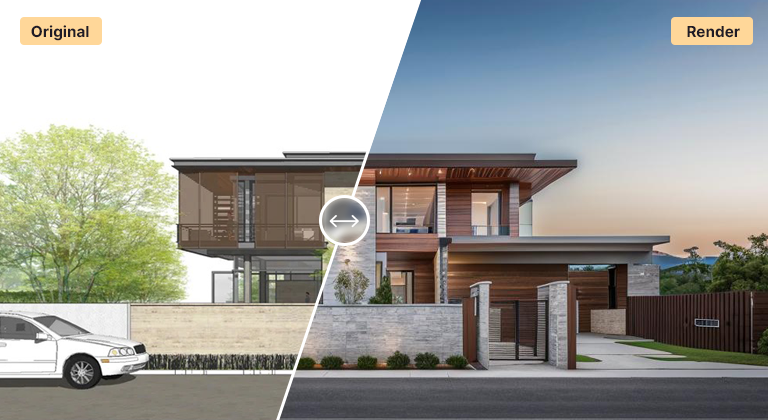
SketchUp users can now generate photorealistic renders without installing rendering plugins or purchasing GPU hardware. AI Render Studio takes your SketchUp viewport export and transforms it into a stunning architectural visualization in under 60 seconds.
The workflow is simple: export a PNG or JPG from any SketchUp viewport, upload it to AI Render Studio, and let the AI add realistic materials, lighting, landscaping, and atmospheric effects. No V-Ray plugin, no Enscape license, no rendering queue. The AI understands SketchUp geometry and preserves your design composition while enhancing visual quality to photorealistic standards.
This is particularly valuable for SketchUp Free and SketchUp Go users who do not have access to professional rendering plugins. But even SketchUp Pro users find AI rendering useful for rapid concept iterations, early-stage client presentations, and generating multiple design variations quickly.
A good SketchUp AI render starts with a tidy viewport. Before exporting, hide the axes and any guides, turn off section planes and the sketchy edge style, and switch on shadows with a sensible time of day so the AI can read depth. Save a Scene for the camera so you can return to exactly the same view after design changes, and export the 2D graphic at the largest size your machine allows.
SketchUp styles matter more than most people expect. A clean white massing model with shaded faces suits conceptual and architectural-model looks. A model with basic colours or textures applied gives the AI clearer material cues for a photoreal result. Profile-heavy hand-drawn styles work, but they tend to push the output towards a sketch-like finish.
AI rendering sits comfortably alongside V-Ray or Enscape rather than replacing them. Use it in the early weeks to explore many directions from quick scenes, then move the chosen option into your usual engine for controlled final imagery. For exteriors, the exterior renderer accepts a SketchUp screenshot directly.
Entourage is optional. Leaving out trees, cars and people often gives cleaner results, because the AI adds context that suits the scene. If you need specific planting or a particular car in front of the building, keep simple placeholders in the model so their position and scale are fixed.
Use cases
Who it’s for
Small practices on SketchUp
Present photoreal concepts without buying render licences or a high-end workstation, and keep design time focused on the model itself.
Interior designers
Turn quick SketchUp room models into styled interior images, testing finishes and furniture moods before committing to a full material setup.
Students and educators
Give studio projects convincing presentation images on a laptop, and spend the time saved on design development rather than render settings.
Design-build firms
Show homeowners realistic options straight from the working SketchUp model during sales meetings and early scope discussions.
Workflow
Traditional rendering vs AI Render Studio
| Task | Traditional workflow | With AI Render Studio |
|---|---|---|
| First client image | Set up materials and lights | About 30 seconds from an export |
| Three massing options | Detail and render each one | Export three scenes, render each |
| Day and dusk views | Adjust sun and lights, render twice | Switch the lighting preset |
| Material study | Edit textures, re-render each time | Name each palette in the prompt |
| Final hero image | V-Ray or Enscape, full control | Upscale, or finish in V-Ray |
Tips
How to get the best results
Shadows on, axes off
Enable shadows for depth and hide axes, guides and section planes. Stray lines in the viewport can be interpreted as real building edges.
Use two-point perspective
Switch to two-point perspective for exteriors so verticals stay straight. It reads as a professional architectural photograph and avoids leaning walls.
Save a Scene per view
Saved Scenes let you re-export the exact camera after edits, so before-and-after renders line up for client comparisons.
Apply rough colours
Even flat colours on walls, roof and glazing help. Telling faces apart gives the AI clearer cues than an all-white model when you want photoreal materials.
FAQ
Frequently asked questions
Do I need a SketchUp plugin to use AI Render Studio?
No. AI Render Studio works independently of SketchUp. Simply export a viewport screenshot as a PNG or JPG from SketchUp and upload it. No plugins, extensions, or integrations are required.
Is there a free AI render for SketchUp?
Yes. New accounts get 3 free credits with no credit card, and each SketchUp viewport render uses one credit. After that, choose a monthly plan or a one-time pack whose credits never expire.
Does it work with SketchUp Free?
Yes. Since AI Render Studio works with standard image exports, it is compatible with all SketchUp versions including SketchUp Free, SketchUp Go, SketchUp Pro, and SketchUp Studio. Any version that can export or screenshot a viewport will work.
How does this compare to V-Ray for SketchUp?
V-Ray for SketchUp requires a separate license, detailed material setup, and significant render time. AI Render Studio generates results in seconds from a simple viewport export. V-Ray offers more precise control for final production renders, while AI rendering excels at speed, concept visualization, and rapid iterations.
Does the AI keep my SketchUp geometry?
Yes. It follows the massing, openings, rooflines and camera of your exported view and adds materials, lighting and context on top. Fine details can be simplified or reinterpreted, so check small elements like railings and mullions. For pixel-exact final images, take the chosen design into your usual render engine.
Can I use SketchUp AI renders commercially?
Yes. Images you generate from your own models can be used in client presentations, proposals, websites and marketing material. As with any visual, make sure the design shown is yours to present and label concept images as illustrative where accuracy matters, such as in sales brochures.
What resolution are the renders?
Renders download at high resolution, ready for screens and presentations. For large prints or detailed crops, run the chosen image through the built-in upscaler. Exporting a larger viewport image from SketchUp in the first place also helps, because the AI has more detail to work from.
Keep exploring
Related tools
Start free
Try AI Render Studio now.
Turn a sketch, model or photo into a photoreal render in seconds. 3 free credits, no credit card.