
Rhino AI Render
Rhino AI — Photorealistic Renders from Rhino 3D
From NURBS to photoreal without plugins or GPU time. Screenshot your Rhino viewport and let the AI do the rest.


 4.9110,000+ architects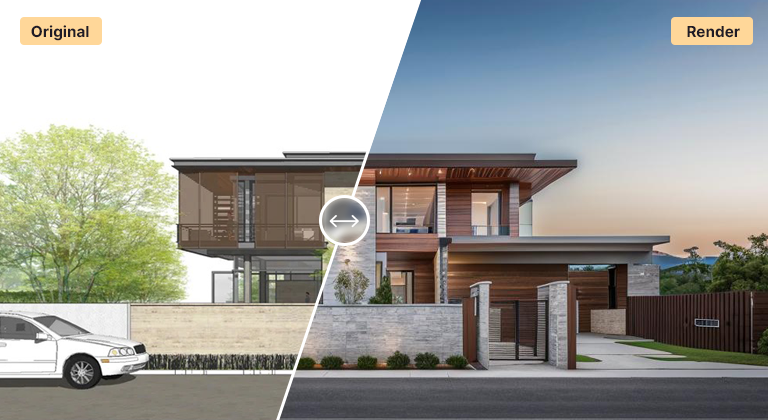
Rhino is unmatched for complex geometry and parametric form, but turning a Rhino model into a compelling visual usually means wrestling with a render plugin. AI Render Studio skips that entirely — export a viewport image and get a photorealistic render in under a minute.
Save any Rhino view as a PNG or JPG, upload it, and the AI adds realistic materials, lighting, and context while respecting your geometry and camera angle. It works for buildings, products, pavilions, and parametric structures, and it pairs naturally with Grasshopper workflows where you generate many design variants quickly.
Because no plugin or high-end GPU is required, Rhino users on any machine can produce client-ready visuals during design reviews and iterate as fast as they can export views.
For a Rhino AI render, choose the display mode with care. Shaded or Arctic modes give clean, even geometry; Rendered mode with simple material colours adds useful material hints; Technical or Pen modes produce strong outlines that suit illustrative output. Turn off the grid, world axes and control points, and use ViewCaptureToFile at a larger size than your screen for crisp edges.
Rhino geometry is often more complex than a typical building, so give the AI context in the prompt. Describe what the form is — a timber gridshell, a perforated metal façade, a cast concrete pavilion — and the setting around it. Without that, an abstract NURBS surface could be read as anything from sculpture to furniture.
Named Views keep cameras consistent across Grasshopper iterations. Bake a variant, restore the view, capture, and repeat; the resulting set renders as a comparable series for design reviews. If you also work in SketchUp for massing, the SketchUp AI render guide covers the same export principles.
For final competition images, many teams still prefer a dedicated engine with full control over materials and lighting. AI rendering is strongest in the weeks before that, when the form is still moving and you need persuasive images every few days.
Use cases
Who it’s for
Computational designers
Render many Grasshopper variants as presentable images for design reviews, without setting up materials and lighting for each iteration.
Façade and envelope specialists
Visualise panelisation, perforation and fin studies on a building in context, comparing options at the same camera and lighting.
Competition teams
Explore atmosphere and narrative images quickly in the early phase, then decide which views deserve full production rendering.
Pavilion and installation designers
Show complex timber, steel or fabric structures in a believable setting for clients, sponsors and fabrication partners.
Workflow
Traditional rendering vs AI Render Studio
| Task | Traditional workflow | With AI Render Studio |
|---|---|---|
| Grasshopper variant | Bake, assign materials, light, render | Bake, capture the view, render |
| Façade options | Set up each option in a plugin | Capture each, use one prompt |
| Site context | Model or import context and planting | Describe the setting in the prompt |
| Mood images | Days of render tests and post-work | Several moods in one sitting |
| Final hero render | Dedicated engine, full control | Upscale the best, or hand off |
Tips
How to get the best results
Hide grid and control points
Turn off the construction grid, world axes, control points and isocurves. They read as unintended lines on the surface or ground.
Capture larger than screen
Use ViewCaptureToFile at two or more times screen size. Fine mullions, ribs and perforations need the extra pixels to survive.
Explain the form
Say what the geometry is and what it is made of. Abstract surfaces benefit from a clear description of material, use and scale.
Add a scale reference
A simple human figure or door in the model anchors scale, so a small pavilion is not rendered as a tower or a large roof as furniture.
FAQ
Frequently asked questions
Do I need a render plugin for Rhino?
No. AI Render Studio works from a standard viewport image export, so you do not need V-Ray, Enscape, or any Rhino render plugin. Export a PNG or JPG and upload it.
Does it work with Grasshopper output?
Yes. Capture or export views of your Grasshopper-generated geometry as images and render them. This is a fast way to visualize many parametric variations without setting up materials for each one.
Will the AI keep my Rhino geometry accurate?
The AI preserves your composition, proportions, and camera angle while enhancing materials and lighting. For exploratory and concept work this keeps your design intent intact; for pixel-exact final imagery a dedicated render engine still offers more control.
Which Rhino display mode should I export?
Shaded, Arctic or Rendered mode with basic material colours work best for photoreal results, because surfaces and depth are clear. Technical and Pen modes give strong outlines that suit sketch-like output. Whatever you choose, hide the grid and control points and export larger than screen size for sharper edges.
Can I use Rhino AI renders for client and competition work?
Yes. Renders made from your own Rhino models can be used in presentations, proposals and competition boards. Check that fine details match your design, since complex surfaces can be simplified, and use a dedicated render engine where competition rules or the client require exact material control.
What resolution are the renders?
Renders download at high resolution for screen presentations and reviews. For boards and large prints, use the built-in upscaler on the chosen image to add sharpness and fine detail. Starting from a larger viewport capture also helps preserve thin elements like fins and mullions.
Keep exploring
Related tools
Start free
Try AI Render Studio now.
Turn a sketch, model or photo into a photoreal render in seconds. 3 free credits, no credit card.