
Blender AI Render
Blender AI Render — Photorealistic Results without Long Cycles
Skip the hour-long Cycles bake. Render your Blender architecture scenes photoreal in about 30 seconds — no GPU farm required.


 4.9110,000+ architects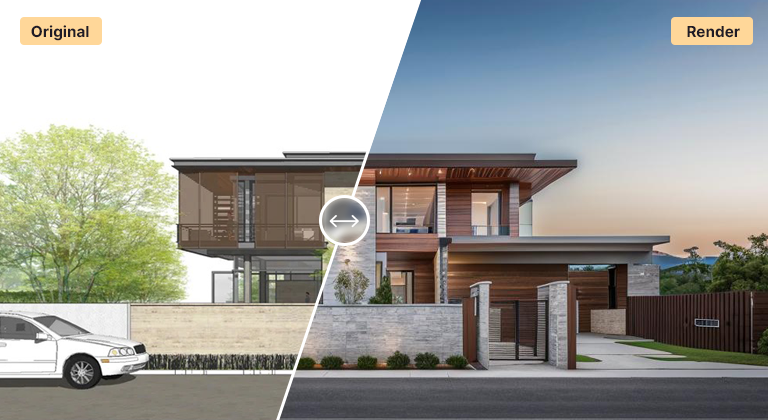
Blender is a powerful free 3D tool, but photoreal architecture renders in Cycles can mean long render times and a serious GPU. AI Render Studio offers a fast alternative — turn a viewport capture or quick clay render into a photorealistic visual in seconds.
Export an EEVEE preview, a Cycles clay render, or a simple viewport screenshot as a PNG or JPG and upload it. The AI adds realistic materials, lighting, and environmental context while preserving your composition and camera. No denoising waits, no GPU bottleneck.
Architecture and product designers working in Blender use this for rapid concept iteration and client-ready previews, then reserve full Cycles renders for the final hero shots that need complete control.
A Blender AI render works best from an export with clear forms and honest lighting. A Workbench render with cavity and shadow enabled, or a Solid viewport with Studio lighting, gives clean geometry in a fraction of a second. An EEVEE preview with basic materials adds colour cues. Use View → Viewport Render Image so overlays, gizmos and the 3D cursor stay out of the picture.
Set up the camera properly rather than screenshotting the viewport at a random angle. A focal length around 24–35 mm suits architecture, and shifting the lens instead of tilting the camera keeps verticals straight. Set the output resolution in the Output Properties so the export is larger than your screen.
Blender is often used next to other tools — massing from SketchUp, detail from Rhino, materials in Blender. AI rendering can sit at any point in that chain: test moods from a quick clay model, then commit to full Cycles work only on the direction the client approves. The interior renderer takes room scenes directly.
Asset libraries and scattered vegetation are optional. For concept stages, leaving them out keeps your file light and lets the AI add context; for final shots where specific furniture or planting must appear, keep simple placeholders so position and scale are fixed.
Use cases
Who it’s for
Freelance archviz artists
Send clients several look-development options early, before investing hours in materials, lighting and long Cycles renders.
Architects new to Blender
Get presentation images from a basic Blender model without first mastering shader nodes, HDRI lighting and render settings.
Designers on laptops
Produce photoreal visuals on a machine without a strong GPU, keeping Blender for modelling and composition only.
Students and studios
Iterate on studio projects quickly with convincing images, and spend scarce lab or render-farm time only on final boards.
Workflow
Traditional rendering vs AI Render Studio
| Task | Traditional workflow | With AI Render Studio |
|---|---|---|
| Concept image | Cycles render with denoising | Workbench export, render in seconds |
| Mood exploration | Swap HDRIs, re-render each | Switch the lighting preset |
| Material options | Build node trees for each set | Describe each palette in the prompt |
| Interior styling | Source and arrange furniture assets | Describe furniture for an empty room |
| Final hero shot | Full Cycles render, full control | Keep Cycles, or upscale the best |
Tips
How to get the best results
Use Viewport Render Image
It renders the camera view without gizmos, overlays or the 3D cursor, giving a cleaner input than a plain screenshot of the interface.
Enable cavity and shadows
In Workbench or Solid mode, cavity and shadow sharpen edges and add depth so the AI reads corners and recesses correctly.
Shift, do not tilt
Keep the camera level and use lens shift to frame tall buildings. Straight verticals make the result look like real architectural photography.
Name materials in the prompt
A clay model has no material information, so describe the façade, floor and joinery you want. Specific wording gives more predictable output.
FAQ
Frequently asked questions
Do I need a powerful GPU?
No. Rendering happens in the cloud, so any machine that can run Blender and export an image can produce photorealistic AI renders — no high-end GPU required.
Should I upload an EEVEE or Cycles image?
Either works. Even a plain viewport screenshot or a fast clay render gives the AI enough geometry and composition to work from. Cleaner inputs generally yield cleaner results.
Is this a replacement for Cycles?
It complements Cycles. Use AI rendering for speed during concept and review stages; use Cycles when you need precise, fully art-directed final imagery.
Do I need an add-on for Blender?
No. AI Render Studio runs in the browser and only needs an image. Render or capture your camera view to PNG or JPG and upload it. Nothing is installed in Blender, so it works with any version and does not interfere with your add-ons or render settings.
Does the AI keep my Blender geometry and camera?
Yes. The composition, massing, openings and camera angle of your export are kept, while materials, lighting and context are added. Very fine details can be simplified or reinterpreted, so check thin elements. When every detail must be exact, finish the approved view in Cycles.
Can I use Blender AI renders commercially?
Yes. Images generated from your own Blender scenes can be used for client work, portfolios, proposals and marketing. If your scene includes third-party assets, the usual licence terms for those assets still apply to how you present them.
Keep exploring
Related tools
Start free
Try AI Render Studio now.
Turn a sketch, model or photo into a photoreal render in seconds. 3 free credits, no credit card.