
Revit AI Rendering
Revit AI — Render Any Revit View in Seconds
Your BIM model already did the hard work. Turn any Revit view into a client-ready visual without leaving the design phase.


 4.9110,000+ architects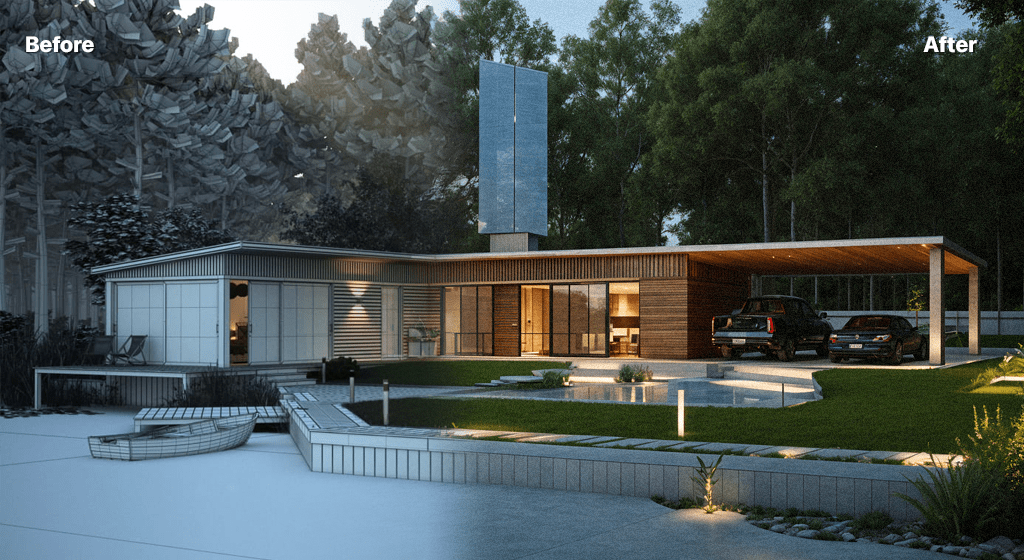
Revit users spend significant time on rendering setups — assigning materials, configuring lighting, and waiting for render engines to produce results. AI Render Studio shortcuts this entire process by transforming Revit viewport exports into photorealistic visualizations in seconds.
Export any 3D view from Revit as a PNG or JPG and upload it. The AI recognizes architectural geometry, adds realistic materials and textures, simulates natural lighting, and generates a presentation-ready render. This works with perspective views, elevations, sections, and even basic Revit camera views without material assignments.
BIM coordinators and project architects find AI rendering invaluable during design development phases where quick visual feedback accelerates decision-making. Generate multiple exterior views, interior perspectives, and design option comparisons without configuring Revit rendering settings or waiting for cloud rendering queues.
It works with every Revit edition, including Revit LT, because it operates on standard image exports rather than native RVT files or a plugin. Perspectives get full photoreal treatment; elevations and sections can be enhanced with shading and materials. Upscale the final choice for print-quality boards.
Revit AI rendering works from any view you can export, but some views give better results than others. Perspective 3D views from a placed camera produce the most convincing images; turn on Realistic or Shaded with edges, enable ambient shadows, and hide the section box, level heads and annotation crop. Save the view so the same camera can be reused after each design change.
Level of development matters less than you might think. A LOD 100–200 model with generic walls and simple curtain walls renders well, because the AI supplies material character. At higher LOD, explicit material assignments and modelled details are followed more closely. Hide workset clutter such as structural analytical lines, MEP elements and linked survey models before exporting.
Design Options are a natural fit. Export the same camera with each option set active and render them in one sitting, so the client compares like with like. For quick exterior checks, the exterior renderer accepts the export directly, and the plan renderer turns floor plan views into furnished 3D plans.
Keep the BIM model as the single source of truth. AI renders are communication images for reviews and presentations, not coordination outputs, so dimensions, specifications and schedules stay in Revit where they belong.
Use cases
Who it’s for
Project architects
Get presentable images of design development views for client meetings without pausing the model to set up materials, lighting and render settings.
BIM managers and coordinators
Give stakeholders a readable picture of the model during reviews, without sharing the RVT file or teaching non-technical attendees to navigate it.
Design teams with options
Render each Revit Design Option from the same camera to compare façades, massing or interior layouts side by side.
Bid and proposal teams
Turn early Revit massing into persuasive bid imagery on a tight deadline, then commission final visualisation once the project is won.
Workflow
Traditional rendering vs AI Render Studio
| Task | Traditional workflow | With AI Render Studio |
|---|---|---|
| Review image | Assign materials, set sun, render | Export the 3D view, render in seconds |
| Design options | Render each option, often overnight | One camera, every option, one sitting |
| Interior view | Model furniture and fixtures in detail | Describe furniture in the prompt |
| Elevation board | Post-produce in Photoshop | Upload the elevation for materials |
| Print image | Long high-quality render pass | Upscale the chosen render |
Tips
How to get the best results
Hide the annotation
Turn off section boxes, level markers, grids and tags in the view template before export. Annotation lines can turn into unwanted geometry.
Use ambient shadows
Ambient shadows and cast shadows give the export depth, which helps the AI read corners, recesses and overhangs as three-dimensional.
Export a dedicated view
Create a presentation view template with consistent visual style and crop, so every option and revision exports with identical settings.
Prompt for materials
If the model still uses generic materials, name the façade in the prompt: “buff brick, bronze window frames, timber soffit”. It replaces missing assignments.
FAQ
Frequently asked questions
Do I need a Revit plugin?
No. AI Render Studio works on exported images, so there is nothing to install in Revit. Export a 3D view as PNG or JPG and upload it.
Do I need to assign materials in Revit first?
No. The AI adds realistic materials and lighting on its own, so even a basic shaded or conceptual mass view renders well. Existing materials are respected when present.
What Revit export settings work best?
Export 3D views as PNG or JPG at the highest resolution available. Both realistic and shaded visual styles work well. The AI handles material enhancement regardless of whether your Revit model has detailed material assignments. Even basic conceptual mass models produce good results.
Can I render Revit sections and elevations?
Yes. AI Render Studio handles Revit 3D perspectives, elevations, sections, and plan views. Each view type is processed appropriately — perspectives get full photorealistic treatment, while plans and sections can be enhanced with shading, materials, and annotations.
Does it work with Revit LT?
Yes. Since AI Render Studio works with standard image exports rather than native Revit files, it is compatible with all Revit versions including Revit LT, Revit, and Revit Plus.
Can I render Revit Design Options and phases?
Yes. Export the same 3D view with each Design Option or phase visible and upload them one after another. Keeping the camera fixed and the prompt identical makes the comparison fair, so clients see the effect of the design change rather than differences in lighting or style.
Does Revit AI rendering keep my BIM geometry accurate?
It follows the massing, openings and proportions in your exported view, which keeps the design recognisable for reviews. It is not a measured output, though, and small elements can be simplified. Use the render for communication and keep dimensions, schedules and coordination in the Revit model.
Is my Revit model uploaded anywhere?
No. You only upload the exported image, never the RVT file, so model data, families and project information stay on your machine. This also means it works with workshared central models and Revit LT without extra setup or permissions.
Keep exploring
Related tools
Start free
Try AI Render Studio now.
Turn a sketch, model or photo into a photoreal render in seconds. 3 free credits, no credit card.