
Archicad AI Rendering
Archicad AI — From BIM View to Photorealistic Render
Your Archicad model, dressed for the client meeting — materials, lighting and landscaping added in seconds.


 4.9110,000+ architects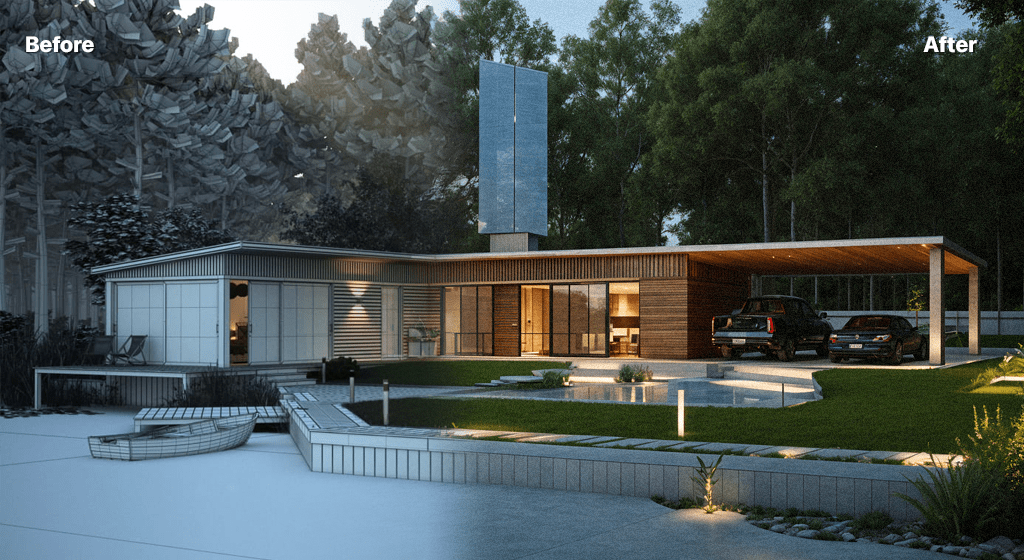
Archicad users can produce photorealistic visuals without configuring CineRender scenes or waiting on long render passes. AI Render Studio turns an exported Archicad view into a presentation-ready render in seconds.
Export a 3D perspective, elevation, or section from Archicad as a PNG or JPG and upload it. The AI interprets your BIM geometry, applies realistic materials and natural lighting, and adds contextual elements — landscaping, sky, people for scale — while keeping your composition unchanged.
This is especially useful during design development, when you need quick, repeatable visuals to support coordination meetings and client reviews without dedicating hours to render setup for every option.
Archicad AI rendering benefits from a carefully prepared 3D window. Use the 3D Style with shading and sun shadows on, switch off contour lines if they are heavy, and hide layers for zones, annotation and 2D fills. Save the camera as a view in the View Map so the same perspective can be re-exported after each design revision, then save the 3D window as a high-resolution PNG.
Graphic Overrides are a quick way to give the AI clearer material cues. A simple override that colours walls, roofs, glazing and landscape differently produces a more legible input than a model where every surface shares the same generic finish, and it does not touch your actual building materials or documentation.
Archicad’s design options and renovation filters fit naturally into this workflow. Export the same view with each option or renovation status shown, render them one after another, and present them together. For floor plan views, the plan renderer turns a plan export into a furnished 3D plan for client packs.
Teamwork projects work without any extra setup, because only the exported image leaves your machine. The BIM model stays the place for quantities, schedules and documentation, while AI renders handle the persuasive side of reviews and client meetings.
Use cases
Who it’s for
Residential architects
Show homeowners photoreal views of their project during design development without pausing to configure CineRender for every revision.
Teamwork project teams
Let any team member produce a presentable image from their workstation, without a dedicated visualisation seat or render machine.
Renovation specialists
Render existing, demolition and new states from the same camera to explain a refurbishment clearly to clients and neighbours.
Planning and consultation
Prepare quick illustrative views for pre-application meetings and community consultation, then commission verified views only where required.
Workflow
Traditional rendering vs AI Render Studio
| Task | Traditional workflow | With AI Render Studio |
|---|---|---|
| Concept perspective | Configure CineRender scenes | Save the 3D window, render in seconds |
| Renovation states | Render each status separately | Export each filter, one prompt |
| Interior view | Place detailed furniture objects | Describe furnishing in the prompt |
| Elevation for clients | Post-produce by hand | Upload it for materials and shading |
| Print board image | Long render at large size | Upscale the chosen render |
Tips
How to get the best results
Save views in the View Map
Saved 3D views keep the camera, layer combination and style fixed, so every revision exports identically and comparisons stay fair.
Use Graphic Overrides
Colour walls, roofs and glazing differently with a presentation override. Distinct surfaces give the AI clearer material cues than uniform finishes.
Hide 2D and zones
Switch off zone, annotation and 2D fill layers before saving the 3D window. Stray fills and labels can become unwanted surfaces.
Turn on sun shadows
Shadows give the export depth, helping the AI read overhangs, balconies and recesses as real volume rather than flat shapes.
FAQ
Frequently asked questions
Which Archicad views work best?
Exported 3D perspectives produce the most dramatic results, but elevations, sections, and shaded views all work. Export at the highest resolution available for the cleanest output.
Do I still need CineRender?
No. AI Render Studio works from a standard image export, so you can bypass CineRender entirely for concept and review-stage visuals. CineRender remains an option when you need fully controlled final imagery.
Does it work with Archicad solo and full versions?
Yes. Because it relies on image exports rather than native files, AI Render Studio is compatible with all Archicad editions that can export or screenshot a view.
Do I need an Archicad add-on to use AI Render Studio?
No. There is no add-on to install. Save the 3D window, an elevation or a plan as a PNG or JPG and upload it in the browser. Because only images are used, it works the same on Mac and Windows and with any Archicad version your office runs.
Can I use Archicad AI renders commercially?
Yes. Images generated from your own Archicad models can be used in client presentations, proposals, planning statements and marketing. Label them as illustrative where accuracy matters, since a render communicates design intent rather than serving as a measured or verified view.
Does the AI keep my BIM geometry?
It follows the massing, openings, roof forms and camera of the exported view, so the building stays recognisable. Fine elements such as railings or thin mullions can be simplified, so check them before presenting. Dimensions and specifications remain in your Archicad model and drawings.
Keep exploring
Related tools
Start free
Try AI Render Studio now.
Turn a sketch, model or photo into a photoreal render in seconds. 3 free credits, no credit card.