Skip to content
Render tools
Image Editing Task - Existing Image Modification Only

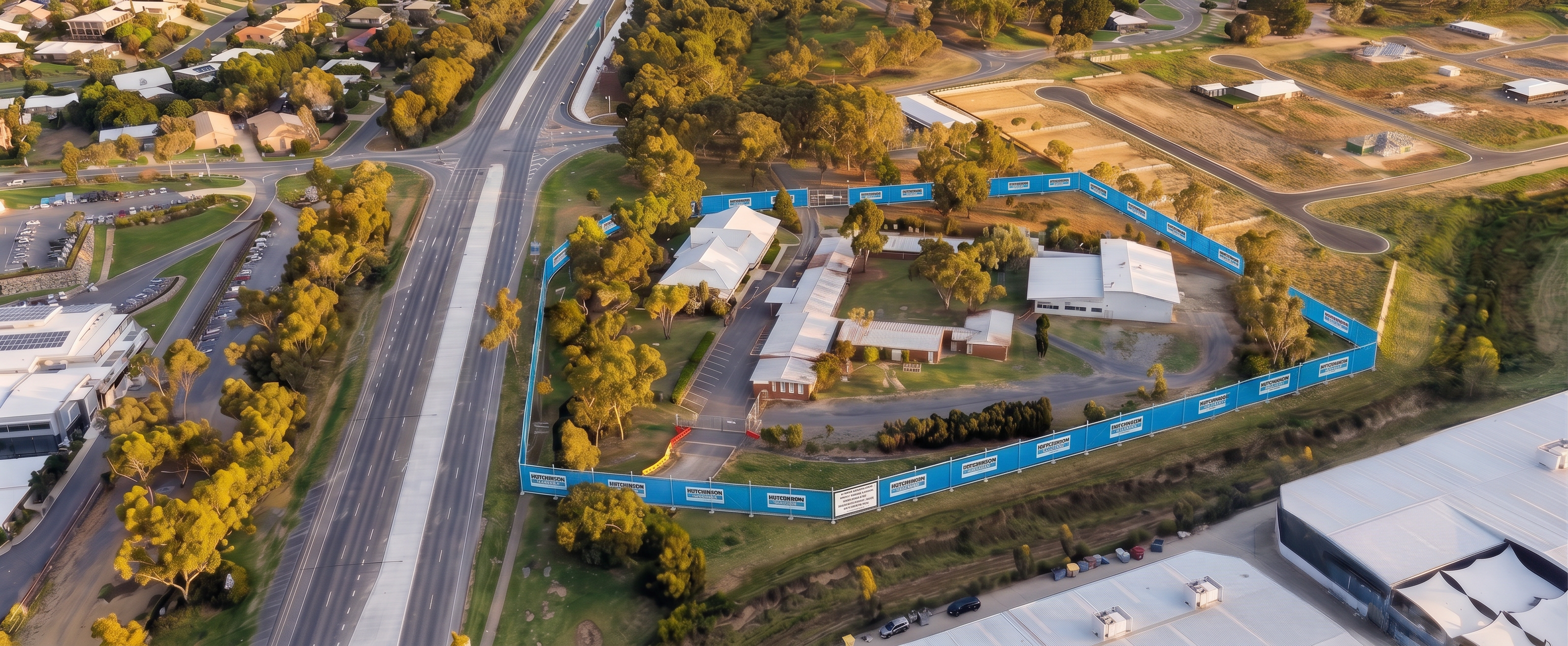
Using the supplied Site Establishment image as the base image and the supplied Hutchinson Builders fencing photo as the fencing reference, update the existing perimeter fencing only.

Replace the current generic construction fencing with Hutchinson Builders branded site fencing matching the reference image.

Maintain:

Exact camera position
Exact perspective
Exact lighting conditions
Exact shadows
Exact site geometry
Exact terrain
Exact vegetation
Exact roads
Exact buildings
Exact colours and textures
Exact aerial viewpoint
Exact image composition

The Hutchinson Builders fencing should consist of:

Temporary chain mesh construction fencing
Blue shade cloth attached to fencing
White Hutchinson Builders logos and branding panels
Branding proportions consistent with the reference image
Realistic fencing posts and supports

Install the branded fencing continuously along the same perimeter alignment as the existing fence.

Ensure the fencing follows the site boundary exactly as currently shown.

Do not alter the location of any fence line, only replace the fence appearance.

No other changes are permitted.

Do not:

Add buildings
Remove buildings
Modify existing structures
Change vegetation
Change roads
Change terrain
Add machinery
Add vehicles
Add site sheds
Add stockpiles
Add workers
Add signage
Add graphics
Add annotations
Change colours or lighting

The final image should appear identical to the supplied image, with the only visible change being the replacement of the existing perimeter fencing with realistic Hutchinson Builders branded blue shade-cloth construction fencing matching the reference photograph.

Success criterion: A direct side-by-side comparison of the original and updated image should show no differences other than the fence type and branding.

Create renders like this

Turn any photo, sketch, or floor plan into a photoreal render in seconds.