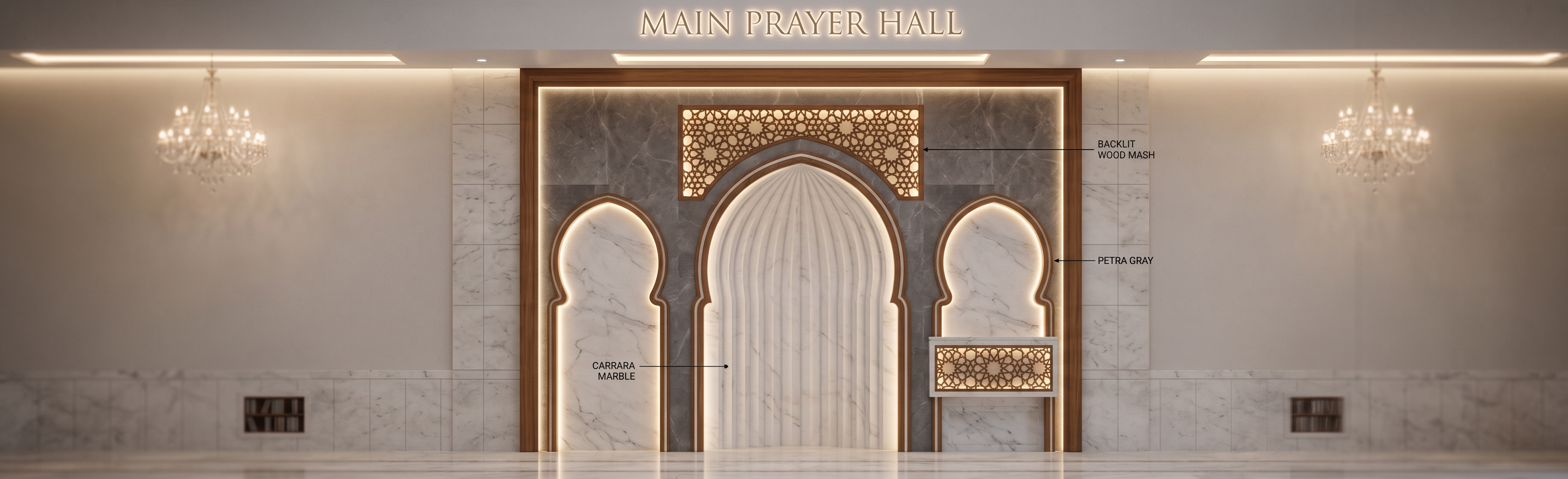
- Prompt
- Create a highly realistic luxury interior render of a mosque Mihrab wall, based on an architectural section drawing. The scene is inside the main prayer hall of a mosque, focused directly on the Mihrab area. The design must keep the exact section/elevation composition: one large central pointed Islamic arch forming the main Mihrab niche, two smaller pointed side arches symmetrically positioned on both sides, a decorative rectangular feature panel above the central arch, and a lower decorative side panel on the right. The Mihrab should feel elegant, spiritual, calm, and premium, with a balanced Islamic architectural identity. The main Mihrab niche is finished in white Carrara marble, with soft grey natural veining, polished but not overly reflective, giving a clean sacred atmosphere. The inner curved Mihrab niche should have vertical ribbed or fluted marble lines following the arch curve, emphasizing height and depth. Use fine marble detailing, precise joints, and realistic stone texture. The surrounding side panels and selected vertical wall areas should include Petra Gray marble, with a darker grey tone, subtle white veining, honed or satin finish, used as a refined contrast against the Carrara marble. The border around the arches should be detailed with a warm luxury trim, using approved wood finish as per the drawing, in a rich medium walnut / oak tone, with smooth polished texture and clean craftsmanship. The wood should frame the arches and decorative panels, giving warmth to the marble composition. Above the central Mihrab arch, create a decorative Islamic geometric wood pattern panel. The pattern should be intricate, elegant, and symmetrical, inspired by traditional Islamic mashrabiya geometry. Behind this wood pattern, add hidden warm LED backlighting, creating a soft glowing effect through the pattern openings. The light should be warm white, around 2700K–3000K, subtle and premium, not harsh. Add another matching backlit wood-pattern feature panel at the lower right side as shown in the section. Integrate continuous LED strip lights along the ceiling recesses above the Mihrab area, matching the drawing notes. The LED strips should create a soft linear glow washing down the wall and highlighting the marble and wood textures. Add small recessed LED lights where indicated, with realistic warm reflections on the marble surface. Include elegant mosque chandeliers or pendant lights in the prayer hall background, softly visible but not distracting. The surrounding prayer hall walls should be clean, bright, and minimal, using light neutral plaster or stone finish, allowing the Mihrab to be the main focal point. Keep the floor in polished stone or marble, reflecting the warm lighting subtly. The overall atmosphere should feel peaceful, luxurious, and sacred, suitable for a high-end mosque interior in Qatar. Use a front-facing orthographic elevation / section-style render, perfectly centered on the Mihrab wall, with accurate proportions, symmetry, clean vertical alignment, and no exaggerated perspective distortion. Maintain the architectural language of the uploaded section. Show realistic material thickness, marble joints, arch depth, shadow gaps, LED coves, and refined construction details. Rendering style: ultra-realistic architectural visualization, luxury mosque interior, high-end material finish, soft warm lighting, realistic shadows, global illumination, ray-traced reflections, 8K quality, sharp details, premium consultant presentation render, calm spiritual ambience, no people, no furniture blocking the Mihrab, no text, no watermark. Negative Prompt Do not change the Mihrab shape or arch proportions. Do not add colorful patterns, carpets over the wall, excessive gold, random ornaments, people, furniture, modern abstract shapes, incorrect materials, rough concrete, glossy plastic, exaggerated reflections, dark lighting, low-resolution textures, distorted arches, asymmetrical layout, or non-Islamic decorative elements.
- Created
- June 13, 2026