Skip to content
Render tools
IMAGE-TO-IMAGE ENHANCEMENT ONLY

This is NOT a redesign task.

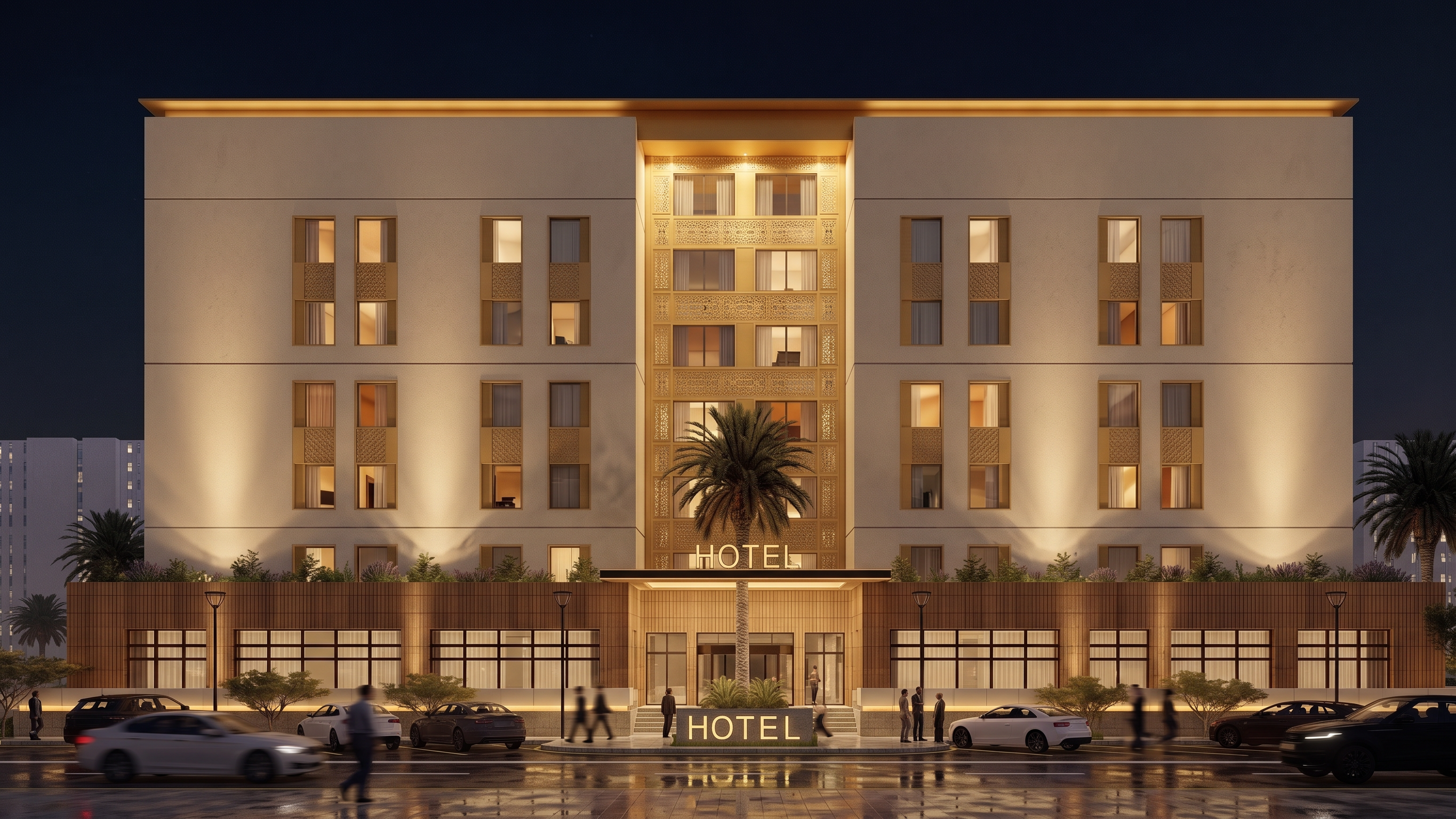
The provided image is an approved final architectural design.

Use the original image as the ONLY source of geometry, composition, materials, colors, lighting layout, façade design, landscaping, and architectural details.

ARCHITECTURE LOCK: 100%
GEOMETRY LOCK: 100%
CAMERA LOCK: 100%
COMPOSITION LOCK: 100%
MATERIAL LOCK: 100%
FACADE LOCK: 100%
LIGHTING LAYOUT LOCK: 100%
DESIGN MODIFICATION: 0%

CRITICAL INSTRUCTIONS:

Preserve the architecture exactly as shown.

DO NOT:

* Redesign architecture
* Modify façade composition
* Change windows
* Change doors
* Change proportions
* Change rooflines
* Change massing
* Change camera angle
* Change perspective
* Change landscaping
* Add architectural elements
* Remove architectural elements
* Add decorative elements
* Modify façade details

EXTERIOR MATERIAL PRESERVATION — STRICT LOCK

Preserve the exact exterior façade material exactly as shown in the original image.

The exterior walls are approved and must remain unchanged.

Maintain exactly:

* Original stucco/plaster finish
* Original façade texture
* Original wall material
* Original wall roughness
* Original material depth
* Original reflectivity level
* Original wall color and tone

DO NOT convert the façade into:

* Stone cladding
* Limestone
* Travertine
* Marble
* Decorative stone
* Concrete panels
* Metal cladding
* Luxury wall systems
* Any new material type

Only improve:

* Texture sharpness
* Material realism
* Surface quality
* Micro details
* Render quality

INTERIOR WINDOW LIGHTING:

Add subtle luxury nighttime interior lighting behind selected windows only.

Lighting Style:

* Sophisticated luxury hotel atmosphere
* Warm dimmed lighting (2700K)
* Soft amber glow
* Low intensity interior lighting
* Selective illuminated windows
* Not all windows illuminated
* Natural variation between rooms
* Some windows dark
* Some windows softly illuminated
* Refined hospitality ambience

Lighting Quality:

* Soft indirect lighting
* No bright white light
* No overexposed windows
* No glowing rectangles
* No strong light spill
* No excessive brightness
* No office building appearance

INTERIOR LIFE AND OCCUPANCY:

Create subtle signs of occupancy without visible people.

Examples:

* Curtains partially opened
* Decorative table lamps
* Floor lamps
* Furniture silhouettes
* Seating silhouettes
* Interior room depth
* Hospitality atmosphere

Window Distribution:

* Approximately 15%–25% of windows softly illuminated
* Majority of windows remain dark
* Natural random distribution
* Different lighting intensity between rooms
* Some rooms appear occupied
* Some rooms appear vacant

Visual Goal:
Create the feeling that guests are using the building without showing identifiable people.

PRESERVE EXACTLY:

* Existing façade lighting
* Existing landscape lighting
* Existing roof lighting
* Existing material colors
* Existing architectural details
* Existing signage
* Existing screens and reflections

RENDERING QUALITY:

* Hyper realistic
* Photorealistic architectural visualization
* V-Ray quality
* Corona Renderer quality
* Physically based rendering
* Ray tracing
* Global illumination
* Ultra realistic glass materials
* Architectural photography quality
* Luxury hospitality visualization
* High-end boutique hotel atmosphere
* 8K detail

NEGATIVE PROMPT:

No redesign
No geometry changes
No façade changes
No wall material changes
No stone cladding
No limestone texture
No travertine
No marble finish
No concrete panel system
No material substitution
No color changes
No lighting redesign
No perspective changes
No camera changes
No added architectural elements
No people
No human silhouettes
No faces
No bodies
No characters
No robots
No mannequins
No pedestrians
No crowds
No AI hallucinations
No overexposed interiors
No strong yellow glow
No bright office lighting
No unrealistic reflections
No cartoon effect

FINAL RESULT:

Keep the building exactly identical to the original image. Preserve the approved façade material, architecture, colors, and lighting design exactly as modeled. Only add subtle luxury interior lighting and realistic signs of occupancy while increasing overall realism and render quality.


Create renders like this

Turn any photo, sketch, or floor plan into a photoreal render in seconds.