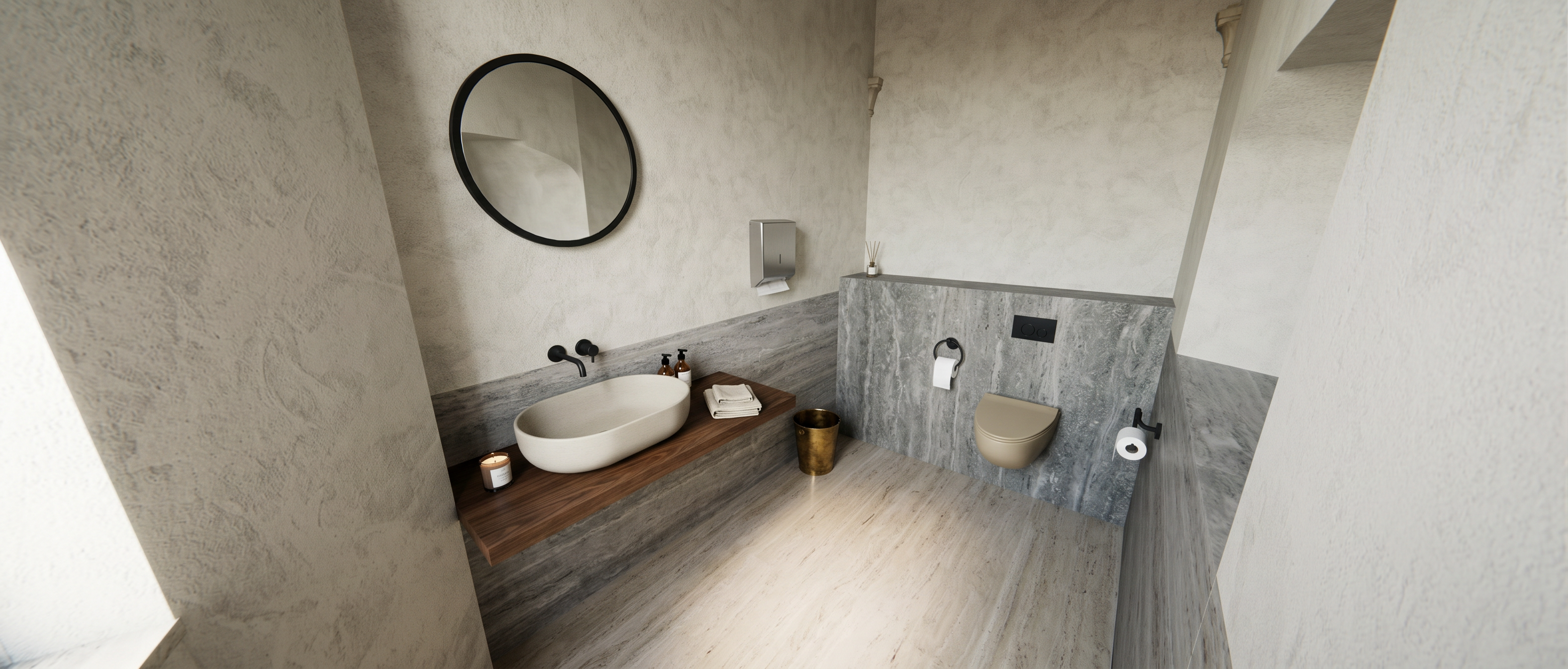
- Prompt
- Transform this SketchUp viewport into a high-end photorealistic architectural interior render.
IMPORTANT: Preserve the exact architecture, geometry, proportions, layout, furniture placement, camera position, camera angle and composition of the original image. Do not redesign or reinterpret the space.
Do not add any new objects, furniture, decorations, plants, windows, doors, fixtures or architectural elements. Do not remove or relocate anything. The final image must represent exactly the same bathroom shown in the reference.
Enhance only the visual quality:
– realistic natural daylight
– soft, physically accurate global illumination
– subtle ambient occlusion
– realistic indirect lighting and soft shadows
– high-quality photorealistic materials
– refined travertine / natural stone surfaces with realistic texture, subtle color variation and roughness
– realistic dark wood vanity with visible natural wood grain
– realistic matte ceramic washbasin and toilet
– realistic black metal fixtures
– physically accurate reflections and roughness
– subtle imperfections and micro-textures in materials
– natural exposure and balanced white tones
– realistic depth, contrast and atmospheric light
– premium contemporary Italian interior photography aesthetic
– sophisticated, warm and minimal atmosphere
– extremely realistic material response and lighting
Keep the original color palette and material identity of the SketchUp model. Do not make the bathroom more luxurious by adding elements; make it more beautiful through realistic materials, lighting, textures and photographic quality.
Architectural visualization, photorealistic, ultra-detailed, physically based rendering, realistic lens and exposure, high-end interior photography, natural imperfections, 4K quality.
STRICT GEOMETRY LOCK:
same camera
same perspective
same walls
same ceiling
same floor
same vanity
same sink
same toilet
same fixtures
same partition
same openings
same proportions
no new objects
no removed objects
no redesigned elements
no composition changes.
- Created
- October 2, 2026