- Prompt
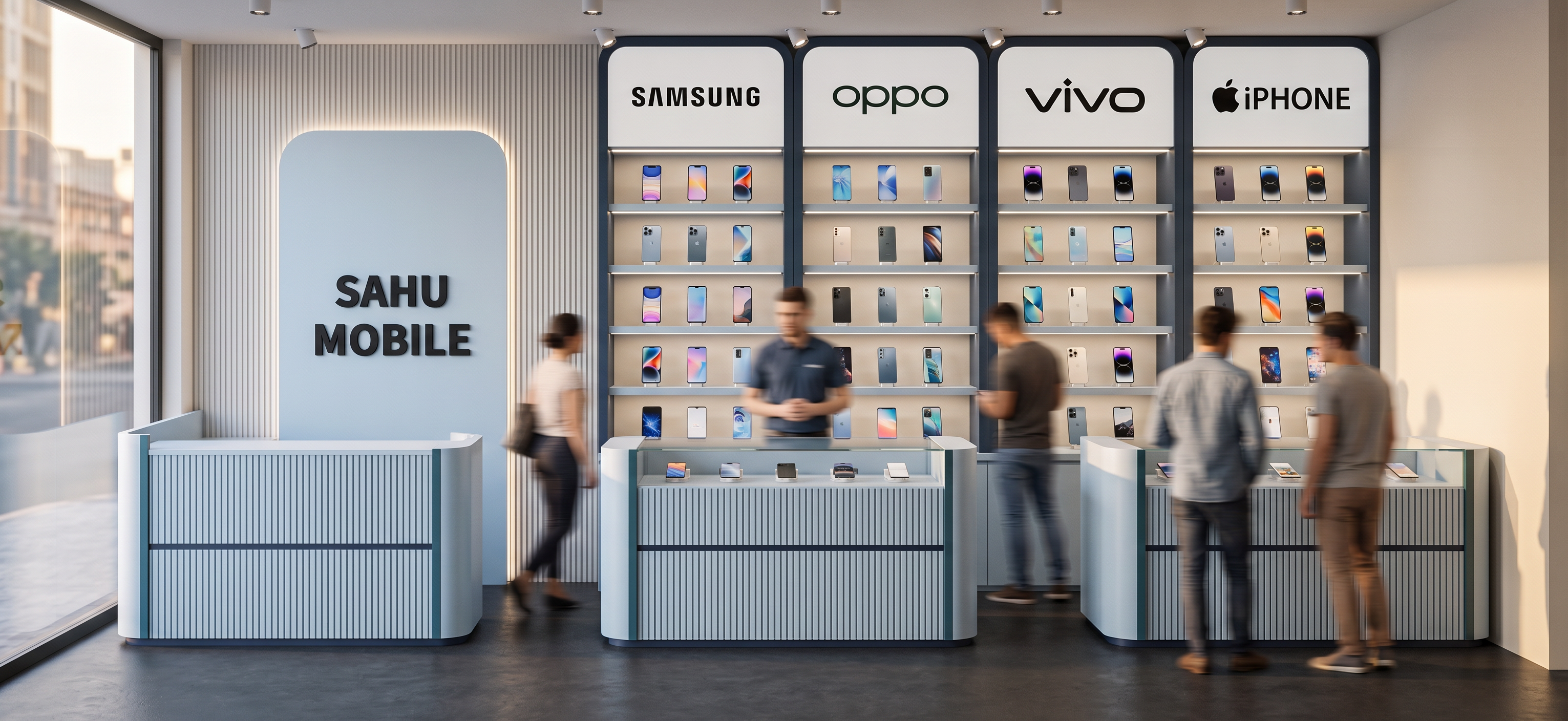
- Create a high-end photorealistic 3D interior render of the EXACT mobile phone retail shop shown in the reference image.
IMPORTANT: Preserve the existing architectural layout, furniture placement, proportions, curves, counters, wall divisions and overall design exactly as shown in the reference. Do NOT redesign or change the basic geometry. Improve only the materials, detailing, lighting, product presentation and realism.
COLOR PALETTE:
Use ONLY the following color palette from the provided reference:
Navy Blue #2F4156
Teal #567C8D
Sky Blue #C8D9E6
Beige #F5EFE8
White #FFFFFF
MATERIAL & DESIGN:
Use a premium matte PU-painted finish on the curved and fluted/louvered counter surfaces.
Use Sky Blue #C8D9E6 as the main accent color on the curved feature panel and selected counter/louver elements.
Use Navy Blue #2F4156 and Teal #567C8D selectively for framing, vertical details and accent portions.
Use warm Beige #F5EFE8 and clean White #FFFFFF for the remaining walls and display surfaces.
Keep the overall look elegant, premium, modern and minimal, with a sophisticated blue-toned mobile showroom aesthetic.
The curved feature panel should clearly display the text “SAHU MOBILE” in clean bold black lettering.
Keep the Samsung, OPPO, vivo and iPhone brand sections clearly visible above the display units.
MOBILE DISPLAY:
Make the wall-mounted mobile display much more realistic and premium.
Each brand section should have properly arranged smartphones displayed individually on clean display shelves/hooks.
Show realistic modern smartphones with different screen designs and finishes.
Add subtle illuminated shelves and small product holders.
The mobile phones should be clearly visible and look like an actual premium retail showroom display, NOT empty white boxes.
Keep the four brand sections separated and organized:
SAMSUNG | OPPO | vivo | iPHONE
COUNTERS:
Keep all three existing counters in exactly the same positions and shapes as the reference.
Give the counters a premium curved/louvered finish with fine vertical grooves.
Use a combination of Sky Blue, White, Teal and subtle Navy accents according to the provided palette.
Make the countertop surface clean and premium.
Add realistic glass/acrylic display areas where appropriate.
Show a few neatly arranged smartphones/accessories on the counters without making them cluttered.
LIGHTING:
Enhance the lighting significantly while keeping it realistic.
Use:
recessed ceiling spotlights
warm-neutral white ceiling lighting
concealed LED strip lighting
slim profile lights inside the mobile display sections
subtle LED lighting under/inside display shelves
soft cove lighting around the curved feature elements
focused accent lighting on the smartphones
Use approximately 3500K–4000K lighting: bright, clean and premium, NOT overly warm or yellow.
The lighting should create realistic highlights and soft shadows and make the mobile phones and displays stand out.
RENDER QUALITY:
Photorealistic architectural visualization, high-end commercial interior photography, realistic material textures, realistic reflections on glass/acrylic, detailed smartphones, clean edges, physically accurate lighting, soft shadows, realistic ambient occlusion, premium retail showroom atmosphere.
CAMERA:
Use a straight-on wide-angle interior camera similar to the original reference image so the complete showroom wall and all three counters are visible.
Eye-level camera, professional architectural photography composition.
Keep the same perspective and proportions as the reference.
FINAL LOOK:
A luxurious yet approachable modern mobile phone showroom.
Clean, bright, sophisticated, premium and Instagram-worthy.
The result should look like a professionally executed real-life interior, not a SketchUp model.
- Created
- August 11, 2026