- Prompt
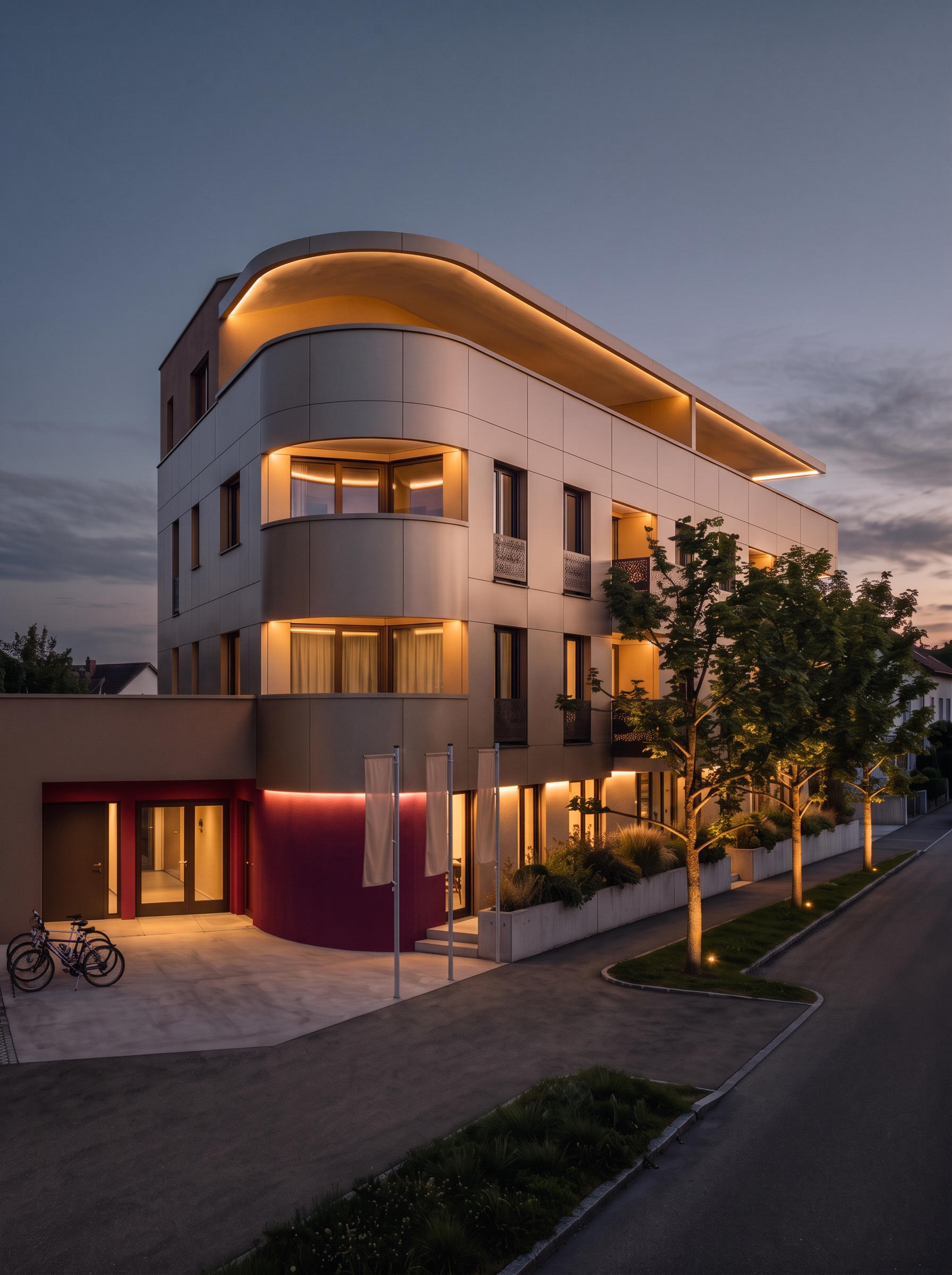
- Use the existing architectural rendering as the exact reference. Everything must remain exactly as it is, except for the following two adjustments.
1. Lighting atmosphere: Make the overall scene feel slightly more like nighttime, while preserving the existing twilight atmosphere. Darken the ambient environment subtly and create a more natural evening mood. Keep all existing architectural lighting, indirect LED strips, illuminated trees, interior lights, and reflections clearly visible and unchanged in their position, color, and design. Maintain realistic exposure and avoid making the image excessively dark.
2. Sky color: Reduce the blue tint of the sky. Use more neutral, muted grey-blue tones with a subtle, natural evening gradient. The sky should feel less saturated and blend more harmoniously with the building, without creating a strong color contrast. Preserve a realistic dusk-to-night transition.
Strict preservation rule: Do not modify the building, facade colors, materials, windows, railings, curtains, landscaping, trees, flags, pavement, neighboring buildings, camera position, perspective, or composition. Do not add, remove, or move any elements. Only adjust the overall nighttime atmosphere and the sky color as specified. The final rendering must remain visually identical to the original in every other respect.
- Created
- October 28, 2026