- Prompt
- HIGH-QUALITY PHOTOREALISTIC 2D FLOOR PLAN RENDER — GROUND FLOOR
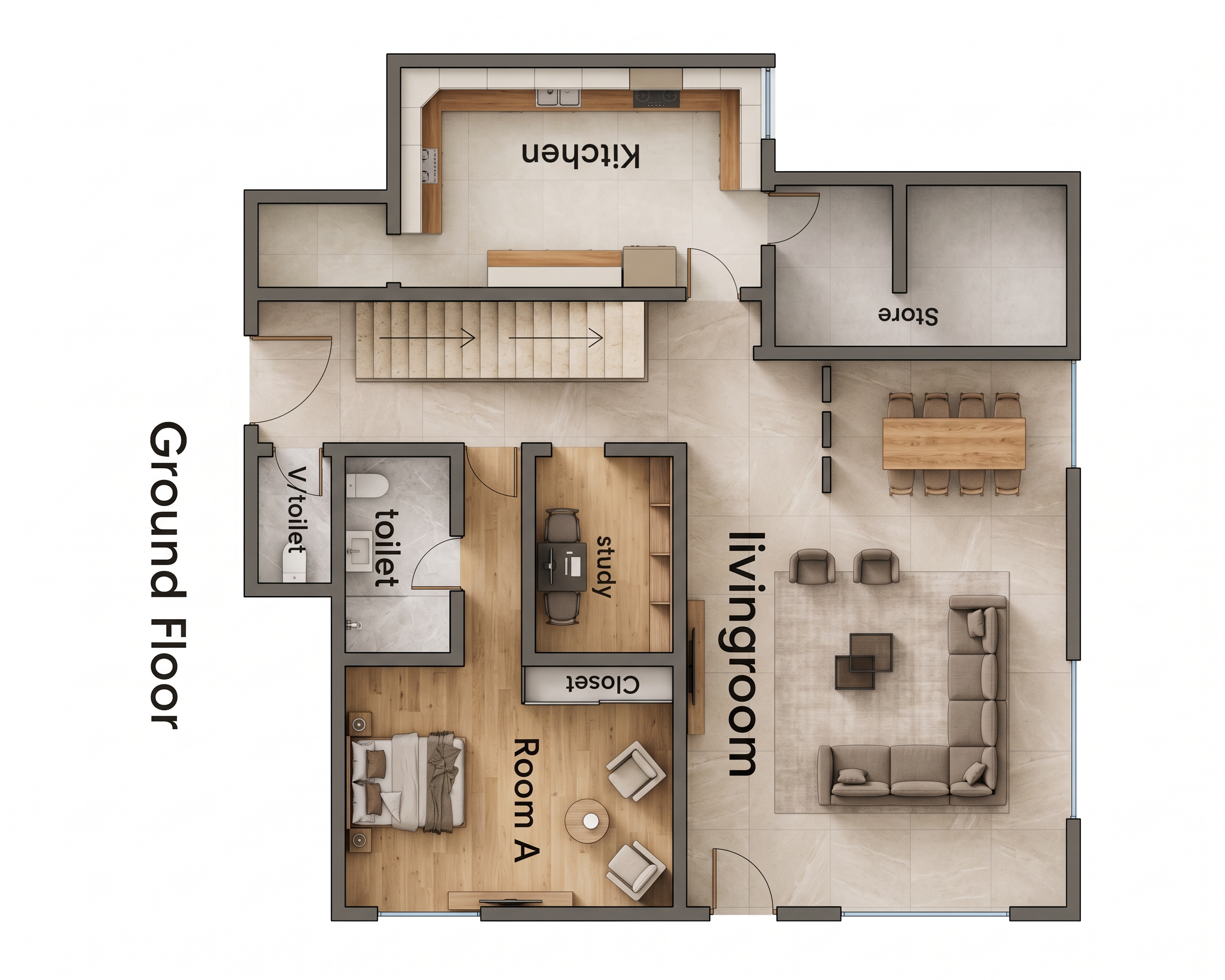
Transform the supplied architectural ground-floor plan into an ultra-realistic, high-resolution 2D rendered floor plan in a perfectly straight top-down orthographic view (90° overhead camera). Use the original drawing as the exact reference. Preserve all existing walls, dimensions, room positions, door openings, door swings, windows, staircase, partitions, furniture placement, and circulation spaces. Do not redesign, relocate, add, or remove any architectural elements.
1. Flooring and Materials
- Living room: Large-format beige porcelain tiles with subtle natural stone texture, matte finish, and minimal grout lines.
- Kitchen: Light cream or warm-grey porcelain floor tiles, with realistic kitchen cabinetry in warm wood, off-white, and subtle beige finishes.
- Store: Neutral light-grey or beige tiled flooring.
- Study: Light natural oak wood flooring with realistic grain.
- Room A: Warm light-grey or natural oak wood flooring, creating a comfortable bedroom atmosphere.
- Toilets and visitor's toilet: Light-grey marble-effect or warm-grey porcelain tiles with realistic WC and washbasin finishes.
- Staircase: Light beige or natural stone treads with clearly defined step edges.
2. Furniture and Interior Styling
Maintain the exact furniture positions and shapes shown in the supplied plan. Render the living-room L-shaped sofa in elegant warm-grey or beige upholstery, with complementary accent chairs, a tasteful centre table, and a subtle neutral rug. Retain the dining table and all eight dining chairs in their original positions. Render the kitchen with realistic countertops, cabinetry, and appliances. Keep the study desk and chairs, bedroom bed and bedside units, bedroom lounge chairs, round coffee table, closet, and all other existing furniture in their precise locations.
3. Lighting and Realism
Use soft, balanced daylight illumination with subtle ambient occlusion beneath walls and furniture. Create realistic contact shadows, accurate material textures, natural wood grain, detailed upholstery, subtle reflections on tiled floors, and crisp architectural edges. Use neutral white lighting without excessive yellow tones, oversaturated colours, harsh shadows, or artificial glare.
4. Rendering Style
Produce a premium architectural presentation image comparable to a professional interior-design studio's photorealistic 2D floor plan. Use a clean top-down orthographic projection with no perspective distortion, no angled camera, no 3D axonometric view, and no cutaway perspective. Walls must have consistent thickness and clean outlines. Clearly distinguish each room through flooring materials while maintaining a coordinated palette of beige, cream, soft grey, natural wood, and white.
5. Image Quality and Output
Ultra-high resolution, sharp architectural details, realistic textures, clean edges, accurate furniture proportions, professional composition, balanced exposure, and a pure white background outside the building footprint. Ensure the entire ground-floor plan fits within the image without cropping.
STRICT INSTRUCTIONS: Follow the uploaded floor plan exactly. Do not alter the architectural layout, staircase direction, door swings, windows, toilet positions, kitchen, store, study, living room, Room A, or furniture arrangement. Do not invent additional rooms or furniture. Keep all room labels legible, correctly oriented, and unobstructed. The final result must look like a professionally rendered 2D floor plan, not a technical black-and-white drawing or a 3D perspective render.
- Created
- October 20, 2026