- Prompt
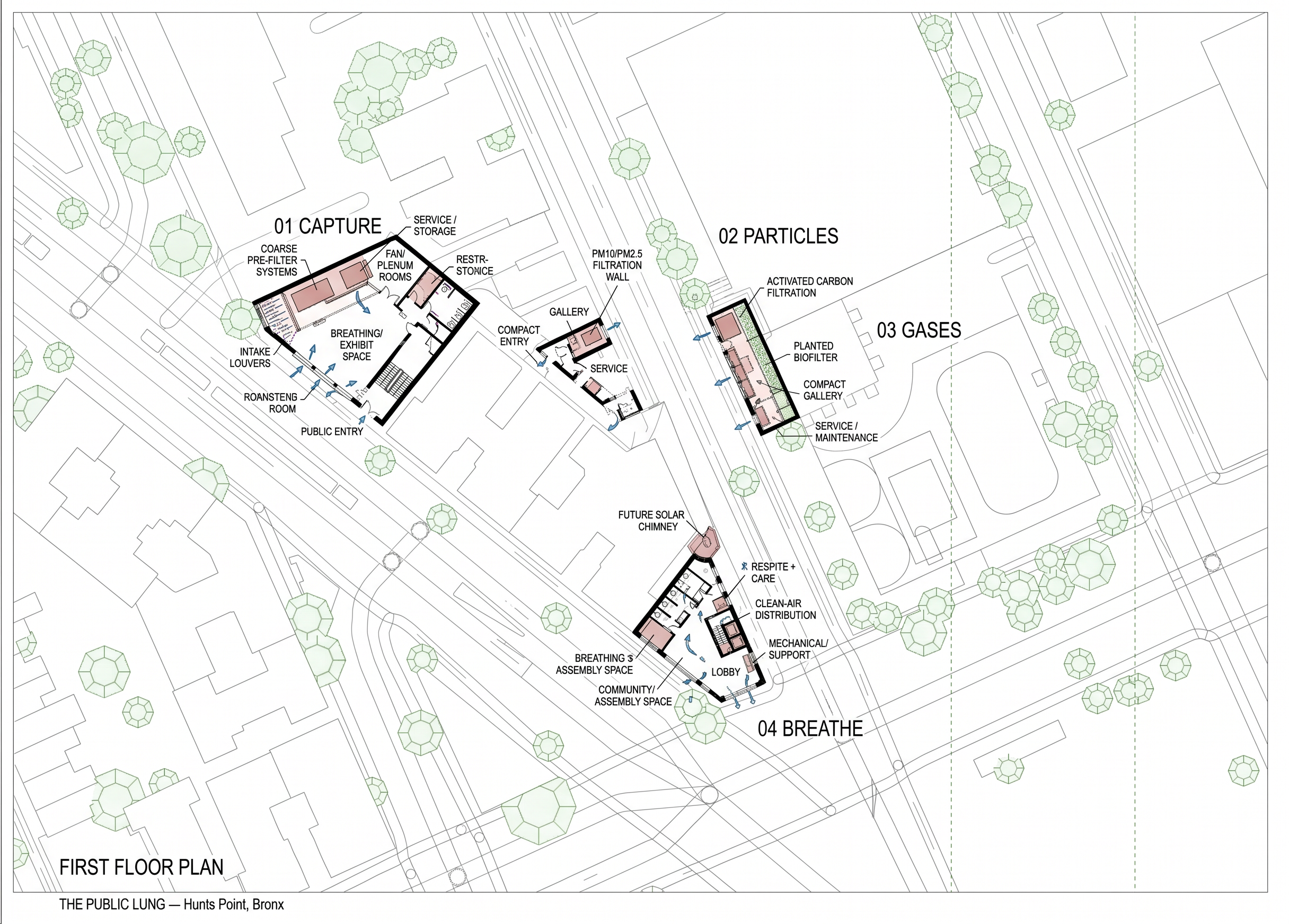
- Use the attached black-and-white site plan as the exact geometric base. Create ONE drawing showing the FIRST FLOOR PLAN for all four Public Lung sites in their true positions. Do not move, rotate, enlarge, simplify, or reshape any of the four black footprints. Keep all surrounding streets, buildings, sidewalks, trees, and context exactly as shown.
Project: THE PUBLIC LUNG — Hunts Point, Bronx.
01 CAPTURE: public entry, intake louvers, coarse pre-filter, fan/plenum, breathing/exhibit space, restroom, service/storage.
02 PARTICLES: very narrow occupiable filter building with PM10/PM2.5 filtration wall, compact entry, gallery, service access, stair only if it truly fits.
03 GASES: very narrow occupiable building with activated carbon filtration, planted biofilter wall, compact gallery, service/maintenance access.
04 BREATHE: main public building with lobby, Breathing Hall, community/assembly space, Respite + Care, restrooms, vertical circulation, clean-air distribution, mechanical/support, and connection to future solar chimney above.
Each site treats air locally. Do NOT connect the four buildings with one giant air duct.
Make these real architectural plans, not diagrams. Show walls, doors, door swings, furniture, stairs, restrooms, structure, mechanical/filter equipment, service clearances, entrances, and circulation.
Style: clean Rhino/Revit/Illustrator plan drawing, white background, heavy black cut walls, thin gray context, restrained green planting, rust/pink filtration equipment, blue airflow arrows only where useful.
Label the four sites:
01 CAPTURE
02 PARTICLES
03 GASES
04 BREATHE
If something does not fit inside the exact footprint, move it to an upper floor instead of changing the footprint.
- Created
- October 18, 2026