
Living Room Ideas
AI Render Studio Team · June 2, 2026
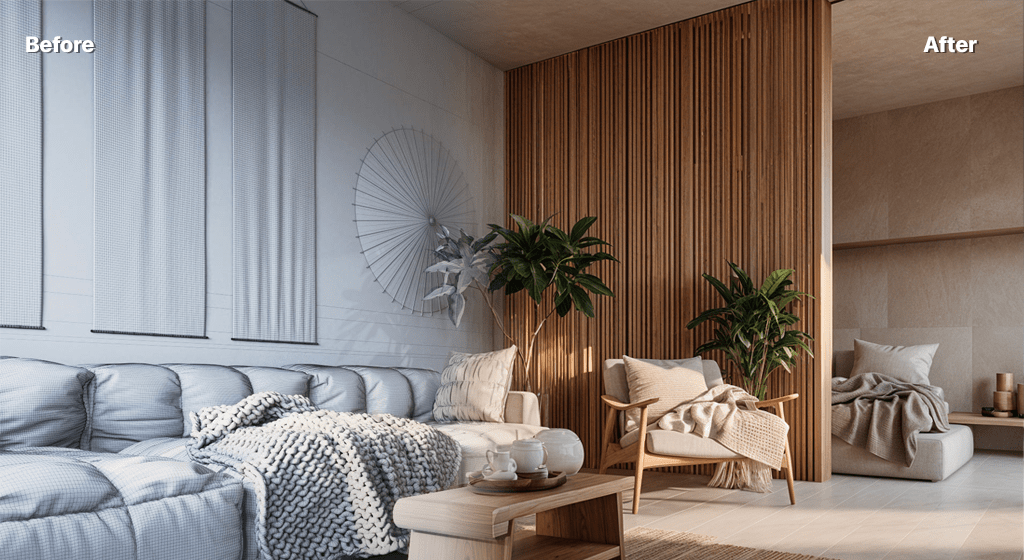
The living room is the hardest-working room in most homes, which is why it pays to get the fundamentals right before chasing trends. Start with layout and light, then layer in style.
Nail the layout first
Anchor seating around a clear focal point — a fireplace, a window, or the TV — and leave generous circulation. Float furniture off the walls in larger rooms to create intimacy.
Layer the lighting
Combine ambient (ceiling), task (reading lamps) and accent (wall or table) lighting so you can shift the mood. Warm bulbs make a living room feel inviting.
Choose a style direction
Whether minimalist, Japandi or bohemian, commit to one direction for cohesion. See our interior design styles guide to find yours.
Add a focal feature
An accent wall, a statement sofa or a large artwork gives the room a centre of gravity.
Preview before you buy
Upload a photo of your living room to the interior render tool and test layouts, colours and styles in seconds. See the full approach in our AI rendering guide.
FAQ
How do I arrange living room furniture?
Anchor seating around a single focal point with clear circulation; in larger rooms, float furniture off the walls to create a more intimate grouping.
Can I preview a living room redesign?
Yes. Upload a photo to AI Render Studio and generate your living room in different layouts and styles before buying anything.
Keep reading
Try it yourself
Render your design in seconds.
Turn a sketch, model or photo into a photoreal render. Start free — 3 credits, no credit card.