
Best Rendering Software for SketchUp (2026)
AI Render Studio Team · May 30, 2026
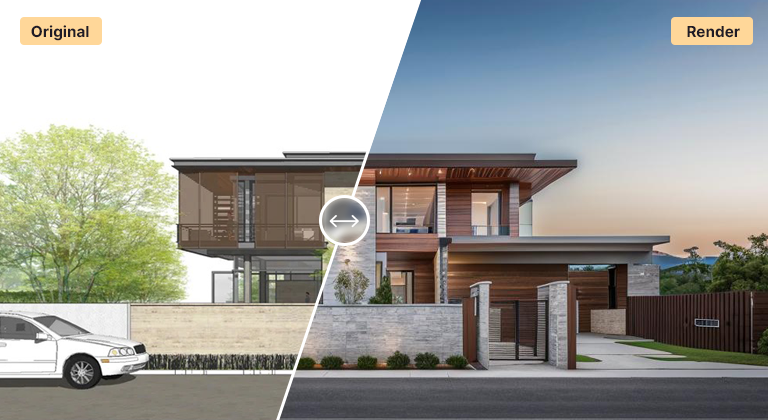
SketchUp is fast to model in but ships without a photoreal renderer, so the right rendering tool makes a big difference to your output. The best choice depends on what you value most: ultimate quality, real-time speed, ease of use, or turnaround time. Here is how the leading options compare in 2026.
V-Ray for SketchUp
V-Ray is the quality benchmark. It delivers physically accurate, fully art-directable photorealism and is the standard for final marketing imagery. The trade-offs are a steeper learning curve, careful scene and material setup, longer render times, and a paid license. Choose V-Ray when the final image quality is non-negotiable and you have time to set scenes up properly.
Enscape
Enscape is a real-time renderer that lives inside SketchUp, so you see a rendered view update as you model. It is excellent for walkthroughs, quick client reviews and VR, with a gentle learning curve. Quality is very good though generally a notch below a tuned V-Ray still. Choose Enscape for interactive, real-time presentation.
Twinmotion
Built on Unreal Engine, Twinmotion is strong for real-time visualization, animation and large site or landscape scenes, with an approachable interface and generous free tier. It is a great fit for context, environment and video, though it is a separate application you export your SketchUp model into.
AI rendering
AI rendering is the fastest path from a SketchUp viewport to a photoreal image, and it needs no plugin or GPU. Export a viewport as PNG or JPG, upload it, and get a photoreal result in seconds — including for SketchUp Free and Go users who cannot run plugins. It trades fine art-direction for speed, which makes it ideal for concept work, early client presentations and producing many options quickly. See the dedicated SketchUp AI render workflow.
Which should you choose?
For final, art-directed hero shots, V-Ray. For real-time, interactive presentation, Enscape or Twinmotion. For the fastest concept and option-study turnaround with no setup, AI rendering. Many SketchUp users combine them — explore with AI, then finish key views in V-Ray or Enscape. For more on the AI side, read how to render in SketchUp and our comparison of AI rendering tools, or the AI rendering guide.
FAQ
What is the best rendering software for SketchUp?
It depends on your priority. V-Ray for ultimate quality, Enscape or Twinmotion for real-time presentation, and AI rendering for the fastest concept turnaround with no plugin or GPU required.
Can I render a SketchUp model without a plugin?
Yes. With AI rendering you export a viewport as a PNG or JPG and upload it — no plugin, license or GPU needed. This also works with SketchUp Free and SketchUp Go.
Is there a free way to render SketchUp models?
Twinmotion has a generous free tier, and AI Render Studio gives new accounts free credits to try AI rendering with no credit card.
Keep reading
Try it yourself
Render your design in seconds.
Turn a sketch, model or photo into a photoreal render. Start free — 3 credits, no credit card.